Put it into the CI!
We need
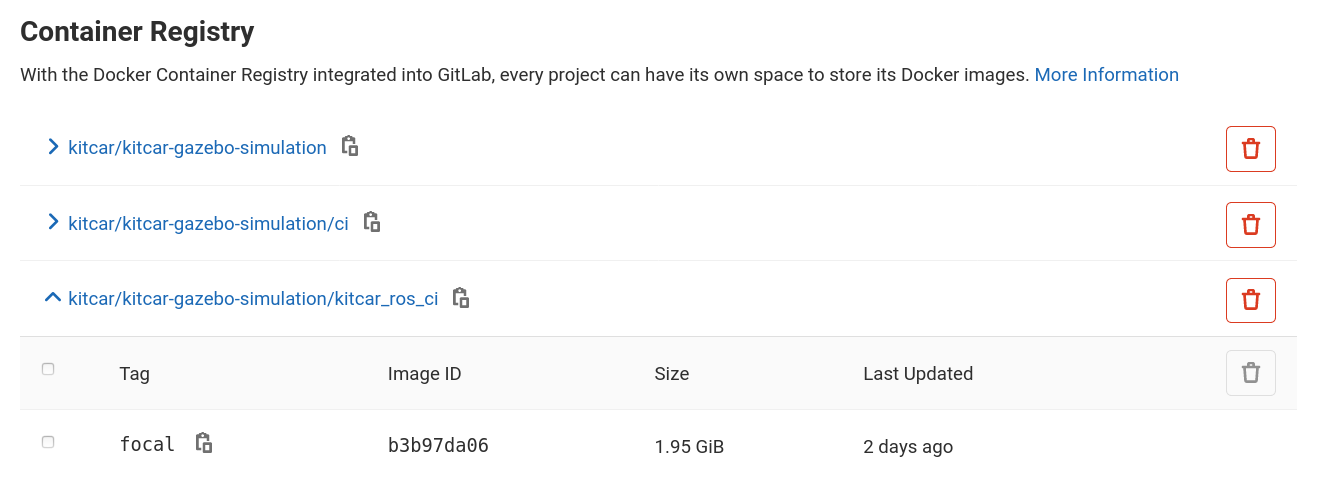
A Docker image that contains the simulation,
is easily maintainable and
accessible from the CI!
A new CI job in the kitcar-ros pipeline that runs the tests,
is integrable without many changes,
uses the simulation Docker image, and
good test cases
with reproducible results
that are clear and precise!
Keep the Image updated
# This is done everytime the master branch is updated
.docker-images-template:
  stage: deploy
  image: docker:19.03.13
  tags:
  - docker
  services:
  - docker:19.03.13-dind
  variables:
    # Ensure that lfs files are available in resulting images!
    DOCKER_HOST: tcp://docker:2375
    DOCKER_TLS_CERTDIR: ''
  before_script:
  - |
    if [ "$CI_COMMIT_REF_NAME" == "master" ]; then
      export TAG_CI_IMAGE=focal
      export TAG_CI_IMAGE_DOCS=docs
      export TAG_CI_IMAGE_ML=machine_learning
      export TAG_DEFAULT_IMAGE_CI=ci
      export TAG_KITCAR_ROS_IMAGE=focal
    else
      export TAG_CI_IMAGE=focal_${CI_COMMIT_REF_NAME}
      export TAG_CI_IMAGE_DOCS=docs_${CI_COMMIT_REF_NAME}
      export TAG_CI_IMAGE_ML=machine_learning_${CI_COMMIT_REF_NAME}
      export TAG_DEFAULT_IMAGE_CI=ci_${CI_COMMIT_REF_NAME}
      export TAG_KITCAR_ROS_IMAGE=focal_${CI_COMMIT_REF_NAME}
    fi
  - apk add --no-cache docker-compose git
  - docker --version
  - docker info
  - docker login -u $CI_REGISTRY_USER -p $CI_REGISTRY_PASSWORD $CI_REGISTRY
  script:
    # Clone kitcar-rosbag
  - git clone https://gitlab-ci-token:${CI_JOB_TOKEN}@git.kitcar-team.de/kitcar/kitcar-rosbag.git
    $KITCAR_REPO_PATH/kitcar-rosbag
    # Test building the ci image
  - cd simulation/docker/ci
    # The argument NO_PARENT_NEEDED is passed to build.sh just to pass any value,
    # the docker-compose just ignores it.
  - /bin/sh build.sh base $TAG_CI_IMAGE NO_PARENT_NEEDED $KITCAR_REPO_PATH $KITCAR_REPO_PATH/kitcar-rosbag
  - docker push $CI_REGISTRY/kitcar/kitcar-gazebo-simulation/ci:$TAG_CI_IMAGE
  - /bin/sh build.sh machine_learning $TAG_CI_IMAGE_ML $TAG_CI_IMAGE
  - docker push $CI_REGISTRY/kitcar/kitcar-gazebo-simulation/ci:$TAG_CI_IMAGE_ML
  - /bin/sh build.sh docs $TAG_CI_IMAGE_DOCS $TAG_CI_IMAGE_ML
  - docker push $CI_REGISTRY/kitcar/kitcar-gazebo-simulation/ci:$TAG_CI_IMAGE_DOCS
      # Test building the default image
  - cd ../default
  - /bin/sh build.sh $CI_REGISTRY $TAG_CI_IMAGE $TAG_DEFAULT_IMAGE_CI $KITCAR_REPO_PATH
  - docker push $CI_REGISTRY/kitcar/kitcar-gazebo-simulation:$TAG_DEFAULT_IMAGE_CI
   # Test building the kitcar_ros_ci image
  - cd ../kitcar_ros_ci
  - /bin/sh build.sh $CI_REGISTRY $TAG_DEFAULT_IMAGE_CI $TAG_KITCAR_ROS_IMAGE
  - docker push $CI_REGISTRY/kitcar/kitcar-gazebo-simulation/kitcar_ros_ci:$TAG_KITCAR_ROS_IMAGE

deploy-docker-images-master:
  extends: .docker-images-template
  # Always run on master
  only:
  - master

deploy-docker-images:
  extends: .docker-images-template
  # Allow to manually build the ci image
  # E.g. to test if the Dockerfile is still working
  except:
  - master
  when: manual
Easy Integration
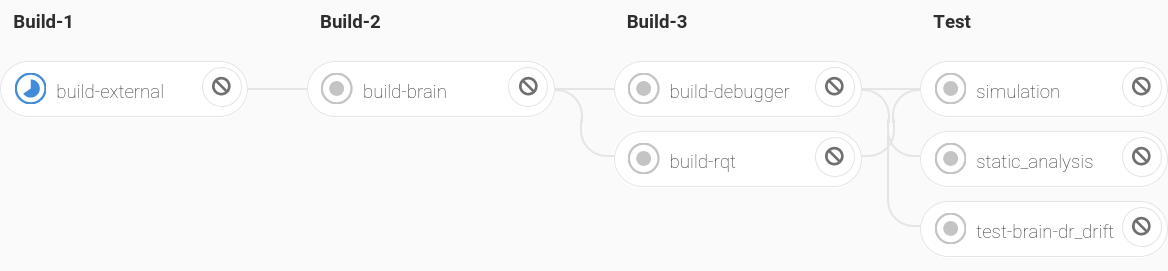
Kitcar-ros Pipeline
simulation:
  stage: test
  image: git.kitcar-team.de:4567/kitcar/kitcar-gazebo-simulation/kitcar_ros_ci:focal
  variables:
    KITCAR_REPO_PATH: /builds/kitcar
    CAR_NAME: dr_drift
    DISPLAY: ":1.0"
  before_script:
    - ...
  script:
    - rostest simulation_evaluation drive.test road:=ci_roads/curves mission_mode:=1
    - rostest simulation_evaluation drive.test road:=ci_roads/obstacles mission_mode:=2
    - rostest simulation_evaluation drive.test road:=ci_roads/intersection mission_mode:=2
    - export INTERSECTION_TURN=1  # Left turn
    - rostest simulation_evaluation drive.test road:=ci_roads/intersection mission_mode:=2
    - export INTERSECTION_TURN=2  # Right turn
    - rostest simulation_evaluation drive.test road:=ci_roads/intersection mission_mode:=2
Results Should be Clear and Precise?
Well…
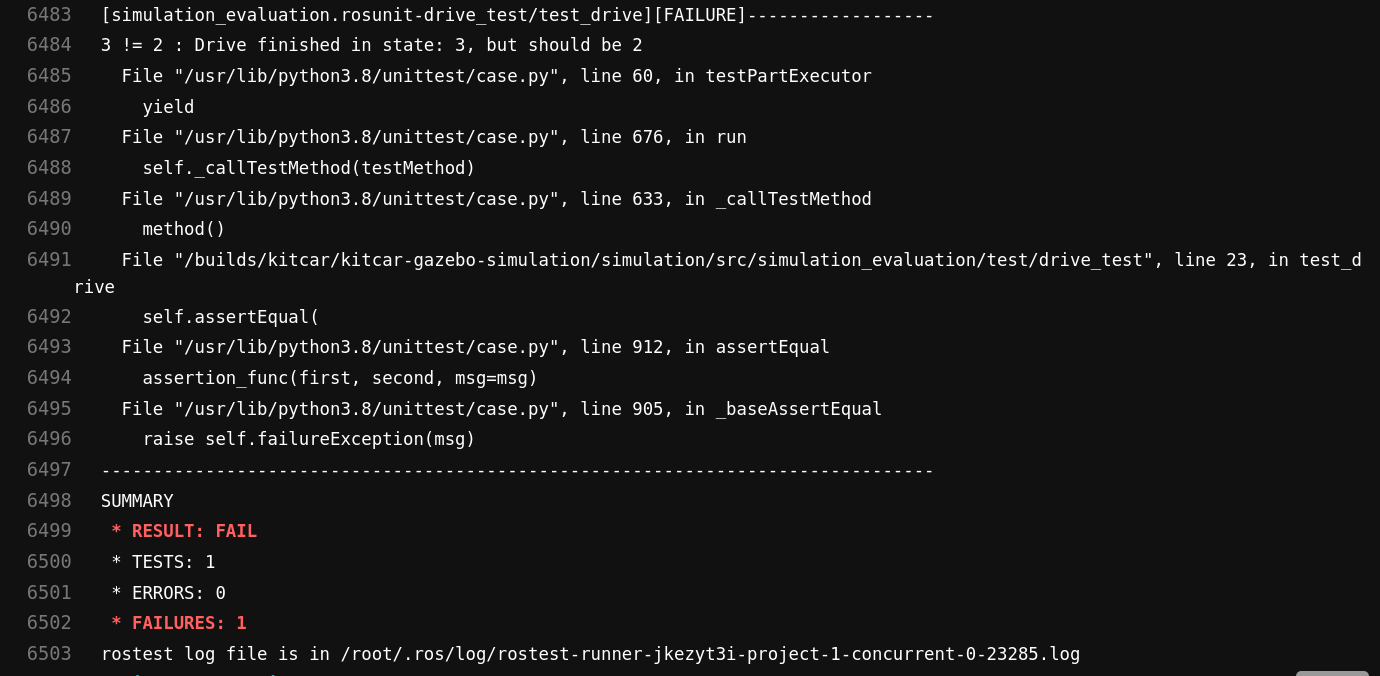
CI Output on Failure.
A good solution on how to deliver the results is still missing!
A good start would be to
record rosbags and deliver them as CI artifacts, and
clearly highlight the configuration of the simulation that errors can be reproduced locally.
Other ideas are very much appreciated…
Go back to Outlook: Possibilities.